This image has been manipulated and rendered using the Rhino design software. It shows the clients company (Cats protection) with the cat design / sculpture outside the building. Alternatively Photoshop could be used to create similar images once the 3D image (sculpture) is finalized and saved. Although Rhino cad and Photoshop have many similarities, the main difference is that Photoshop is a 2D design software, and Rhino is a 3D design software.
FINAL SCULPTURE AND MERCHANDISE DESIGNS ON RHINO CAD
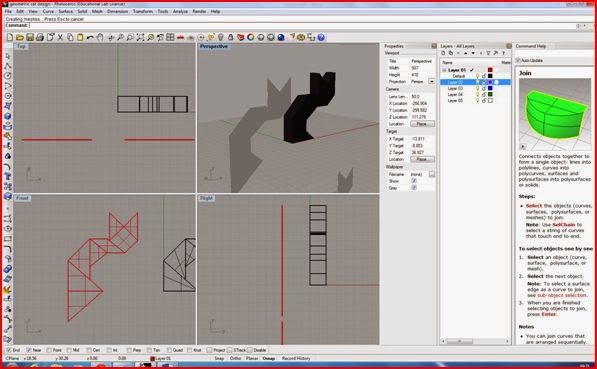
This image was my first attempt to visualizing my geometric cat model on Rhino cad this shows all for views of the model. The process was straightforward and all I basically had to do was draw the outline of the cat to set measurements. Then using the surface tool outline each shape, this allowed me to extrude the surfaces to form a 3D model.
This is similar to the first image except the design is set to ghosted mode (perspective view port).If I turned the model around in the perspective view port there is no surface at the back. This resembled shelves or a cabinet which is not the outcome I wanted, I thought about putting a surface on both sides but decided this was not interesting enough.
At this point I decided to change the design to something a bit more basic and easier to construct but would have more of an effective outcome. It was a 2D model but the lines where the shapes on the cat intersect will be slightly bent. This can be done easily on acrylic using a hot air blower or a strap heater.
2D Technical Drawings
USING RHINO CAD TO CREATE 3D MODELS
Rhinoceros (rhino cad) is a 3D modelling software used in design industries. These include CAD/ CAM, industrial design, architecture, product design, Jewelry design, rapid prototyping, as well as multimedia and graphic design industries. I have been following an introduction course using this program which shows the development of 3D models. I will need to expand my skills as I will be using this program to create 3D models of my sculpture and merchandise designs. Here are a range of screenshots showing different stages creating a torch, a castle and a duck.
CREATING A TORCH
Next the inside of the flashlight is cut out. Similar to the way the hollow Tcone is created, a cylinder is made ( see image to the left) and is used to cut the center of the flashlight using the Boolean difference tool.
Finally the lens and button are added and the torch is rendered .The lens is a thin cylinder which is placed in the center between the Tcone and the base of the flashlight body. To give the lens a realistic look its color can be set to transparent by opening the materials editor and adjusting the transparency. The button is a small sphere and placed on the body its usually easier to do this on the front view port. A gloss finish can also be set on the materials editor.
Here a castle is created using some basic geometric shapes.

A set of blocks are created by selecting the box/cube under solid tools and lining them on top of another in the top view port. This image shows the cubes in all view ports. There are four view ports top, perspective, front and right. 3D models are visualized in the perspective view port.
The cubes are changed from wire frame mode to shaded mode,as you can see in this image on the perspective view port the cubes are no longer transparent. Grid snap is set by clicking on the statues bar below the front and right view port. Grid snap keeps all the squares in line and precisely on top of another. Once one row of cubes are completed and joined ( selecting join tool ) the other three rows can be copied using the copy tool.
The process of creating the cube shapes and joining them is continued till the final structure of the castle is made. The spheres and cones can all be found under the solid tools. These shapes are then added, it is often easier to do this in the top view port.

The castle is then set to rendered mode and the colors/ textures can be manipulated. This is done by window selecting the area on any of the view ports, then selecting render tools, then set render color. Surface textures can also be added for example "brick" by downloading a brick texture, then adding it to the texture palette under render.

A DUCK
For the ducks body two spheres are created and are set to deformable, to allow a change to the form. The rebuild tool is selected under the edit bar, and the point is set to 8 and degree to 3. Next the points are turned on and the body and head can be adjusted. Scale 1D command can also be used to drag the body in one direction.
This stage shows a neck and a beak added to the duck. Curves are created to areas that need to be split and are used as a cutting tools. The curve from the head is extruded until it intersects with the body. The curves are then deleted and the blend surface tool is to create the neck by adjusting the blend bulge(dialogue box)to 1.0,1. The neck will connect to the body atomically.
Here the duck has been rendered and the eyes are added. First all the areas are joined (using the join tool) except an area you want to render e.g leave the beak out. The properties command is used to assign the materials and render colour is chosen. Select perspective and click render display this will show the colour of the beak. The same applies to the colour of the body. A gloss can also be set.
Finally the eyes are created using an the ellipsoid tool and a circle in made in the centre of it. This is extruded and used as a cutting tool. The colour in then changed to black. Orient on surface tool is used to allow the eyes to be placed on the ducks body and the mirror is then used to copy the eye on the other side of the ducks head. The frames can be deleted and the duck is then completed.
DIGITAL SCULPTURE PROJECT DESIGN SHEETS
Initial Ideas for Sculpture....
Initial ideas and developing ideas for Sculpture....
Ideas for merchandise....
Here are a few of my design sheets for sculpture and merchandise ideas.
RISK ASSESSMENT
Risk assessments are used to identify hazards and risks. Once these have been identified, processes are put in place to eliminate the hazards and reduce the risks where possible. If they cannot be eliminated they are minimized by the use of physical controls or, as a last resort, through systems of work and personal protective equipment
NON DISCLOSURE AGREEMENT
Non disclosure agreements, sometimes called NDAs
LOGO DESIGNS
Here are a couple of logos which I have designed, as I am now at the stage of approaching prospective clients with my sculpture / merchandise ideas. I have also generated a list of prospective clients/company's for each idea, and a suitable location for the sculpture.
Often a logo is the first impression your client will get of you or your company so it is important it is distinct, it identifies you or your company in quick visual symbolic way and communicates what your company represents well.
CONCEPTS AND ILLUSIONS
AFTER CHOOSING WHAT IDEAS I WOULD DEVELOP FURTHER, I DECIDED I WOULD CHANGE THE FORM AND SHAPE OF ONE OF THE DESIGNS, WHICH WAS A SCULPTURE TO REPRESENT INNOVATION AND THE FUTURE. THIS LED ME TO LOOKING AT OPTICAL ILLUSIONS FOR INSPIRATION.....

PENROSE TRIANGLE - WHAT SEEMS IMPOSSIBLE CAN BE MADE POSSIBLE ??
It is not the drawing itself that is impossible, but only your three-dimensional interpretation of it, which is constrained by how you interpret a pictorial representation into three-dimensional mental model. Given the chance to interpret a drawing or image as three-dimensional, your visual system will do so. It does not generally take a perspective drawing and reinterpret it as flat, because there is a spatial paradox.

DO YOU LOOK THROUGH THE CYLINDER
THROUGH THE LEFT OR THE RIGHT ??
FUTURISTIC SPIRAL ILLUSION


PENROSE TRIANGLE - WHAT SEEMS IMPOSSIBLE CAN BE MADE POSSIBLE ??
It is not the drawing itself that is impossible, but only your three-dimensional interpretation of it, which is constrained by how you interpret a pictorial representation into three-dimensional mental model. Given the chance to interpret a drawing or image as three-dimensional, your visual system will do so. It does not generally take a perspective drawing and reinterpret it as flat, because there is a spatial paradox.

DO YOU LOOK THROUGH THE CYLINDER
THROUGH THE LEFT OR THE RIGHT ??
FUTURISTIC SPIRAL ILLUSION

LEGISLATION'S RELEVANT TO MY DESIGN IDEAS
After generating a series of design ideas I presented them to a number of designers who gave me feedback on the strongest concepts and which of them I should develop further. My next step now is to develop my initial ideas and to search for prospective clients, but before I do this I am going to do further research on the legislation's that might be relevant to my own designs. This information will be beneficial to me when presenting my designs to clients. Most of the legislation's that apply to designers can be found on the intellectual property office website. Intellectual property allows designers to own the work they create, so the right protection will differ depending on the design.
There are four different types -
COPYRIGHT- This right protects the written, theatrical, musical and artistic works as well as film, book layouts, sound recordings and broadcasts. Copyright is an automatic right, which means you would have to apply for it.
TRADEMARK- A trademark is a sign which can distinguish your goods and services from those of your competitors it can be words, logos or combination of both.
PATENT- Patents protect the methods and processes that make things work the intellectual property office can help you decide if it is the right protection for you.
DESIGN- A registered design is a legal right which protects the overall visual appearance of product or a part of a product in the country or countries you register it in.
So what legislation's might be relevant to my designs?
The ideas I will be developing further are the 3D geometric cat, the two sided head sculpture and the innovation speeding car sculpture. For the 3D cat design I could apply for the design right, trademark and copyright as this would protect any images being copied of it and also the advertising aspect. The two sided head sculpture would be the same as a patent right would not really benefit this design as it has no real function and it is mainly a sculptural piece. What the patent right might be useful for is any merchandise I decide to create for the sculptural pieces, as these might have a function and might work in certain way. The sculpture of the speeding car will benefit from all these rights as it will be placed as a symbol of innovation for a building.
If your still here ... thanks for reading!
There are four different types -
COPYRIGHT- This right protects the written, theatrical, musical and artistic works as well as film, book layouts, sound recordings and broadcasts. Copyright is an automatic right, which means you would have to apply for it.
TRADEMARK- A trademark is a sign which can distinguish your goods and services from those of your competitors it can be words, logos or combination of both.
PATENT- Patents protect the methods and processes that make things work the intellectual property office can help you decide if it is the right protection for you.
DESIGN- A registered design is a legal right which protects the overall visual appearance of product or a part of a product in the country or countries you register it in.
So what legislation's might be relevant to my designs?
The ideas I will be developing further are the 3D geometric cat, the two sided head sculpture and the innovation speeding car sculpture. For the 3D cat design I could apply for the design right, trademark and copyright as this would protect any images being copied of it and also the advertising aspect. The two sided head sculpture would be the same as a patent right would not really benefit this design as it has no real function and it is mainly a sculptural piece. What the patent right might be useful for is any merchandise I decide to create for the sculptural pieces, as these might have a function and might work in certain way. The sculpture of the speeding car will benefit from all these rights as it will be placed as a symbol of innovation for a building.
If your still here ... thanks for reading!
INSPIRATION
Subscribe to:
Posts (Atom)